help.linkrhinos.com
Go to App
Home>Knowledge Base>Account>How can I invite a team member?

How can I invite a team member?

Alex Carry
Alex Carry Updated 2 months ago
1 min read

You can easily add new members to your team to collaborate effectively. The invitation process is simple and only requires their email address. Follow these steps:

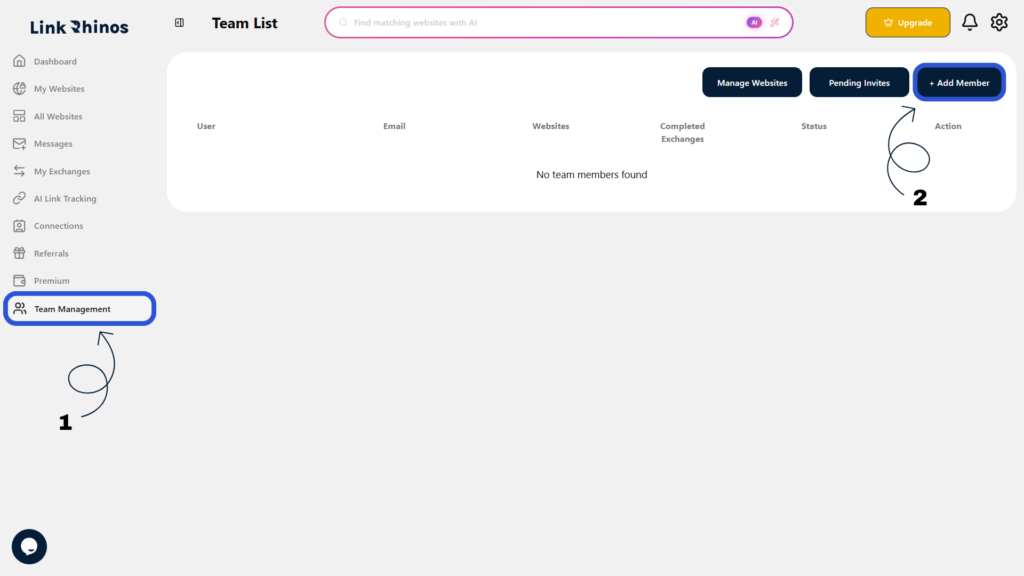
1: Go to Team Management

Navigate to “Team Management” from your main dashboard.

2: Click Add Member

Locate and click the “Add Member” button to open the invitation form.
3: Enter Email and Send

Type the team member’s email address and click “Send Invitation” to dispatch the invite.
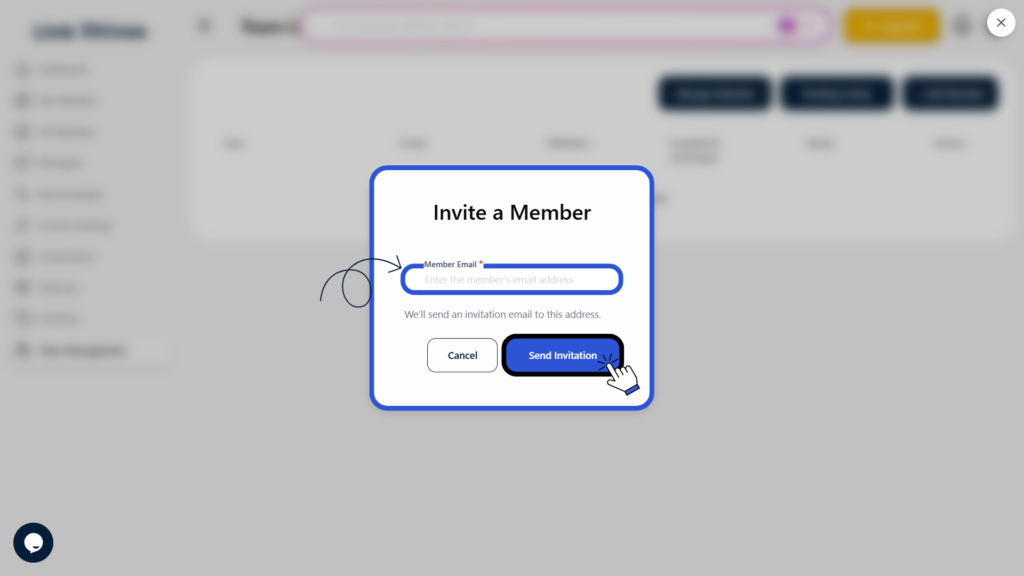
Once the invitation is sent, you will see a confirmation message, and the invitation will appear under Pending Invites until the user accepts it.

Was this article helpful?

Table of Contents

Related Articles

Can I remove a team member completely?

Account

What should I do if the invited user did not receive the email?

Account

Can I transfer a website from one member to another?

Account

Need more help?

Our support team is available 24/7 to assist you.

Contact Support

© 2026 help.linkrhinos.com. All rights reserved.

  • Contact Support
  • Privacy Policy
  • Terms of Service